· on this page
An AI agent platform is the scaffolding around an LLM that lets it call tools, remember things across turns, plan multi-step sequences, and run without a human at every loop. The space split in 2024 into two camps: SDKs from the model providers (Anthropic, OpenAI) and framework libraries that sit on top of any model (LangGraph, CrewAI, AutoGen). Both camps ship production agents now. The choice is less about capability and more about fit.
Six platforms cover the realistic build space for most teams in 2026. This guide goes through each, then lays out a picking framework and answers the questions that most often gate a decision.
At-a-glance comparison
| Platform | Model | Multi-agent | Language | Control |
|---|---|---|---|---|
| Claude Agent SDK | Claude 4.x | Native subagents | TS, Python | Model-driven |
| OpenAI Agents SDK | GPT-5.x | Handoffs API | TS, Python | Model-driven |
| LangGraph | Any | Yes (nodes) | Python, TS | Graph-driven |
| CrewAI | Any | Yes (roles) | Python | Role-driven |
| n8n | Any (node) | Via subflows | No-code, JS | Workflow-driven |
| Microsoft AutoGen | Any | Yes (groups) | Python, .NET | Conversation-driven |
Claude Agent SDK (Anthropic)
The official agent SDK from Anthropic, launched in 2024 as a successor to the earlier Messages API tool-use pattern. Works with Claude Opus 4.7, Sonnet 4.6, and Haiku 4.5. Native support for subagents, long-running tool calls, artifact generation, and MCP-compatible tool servers.
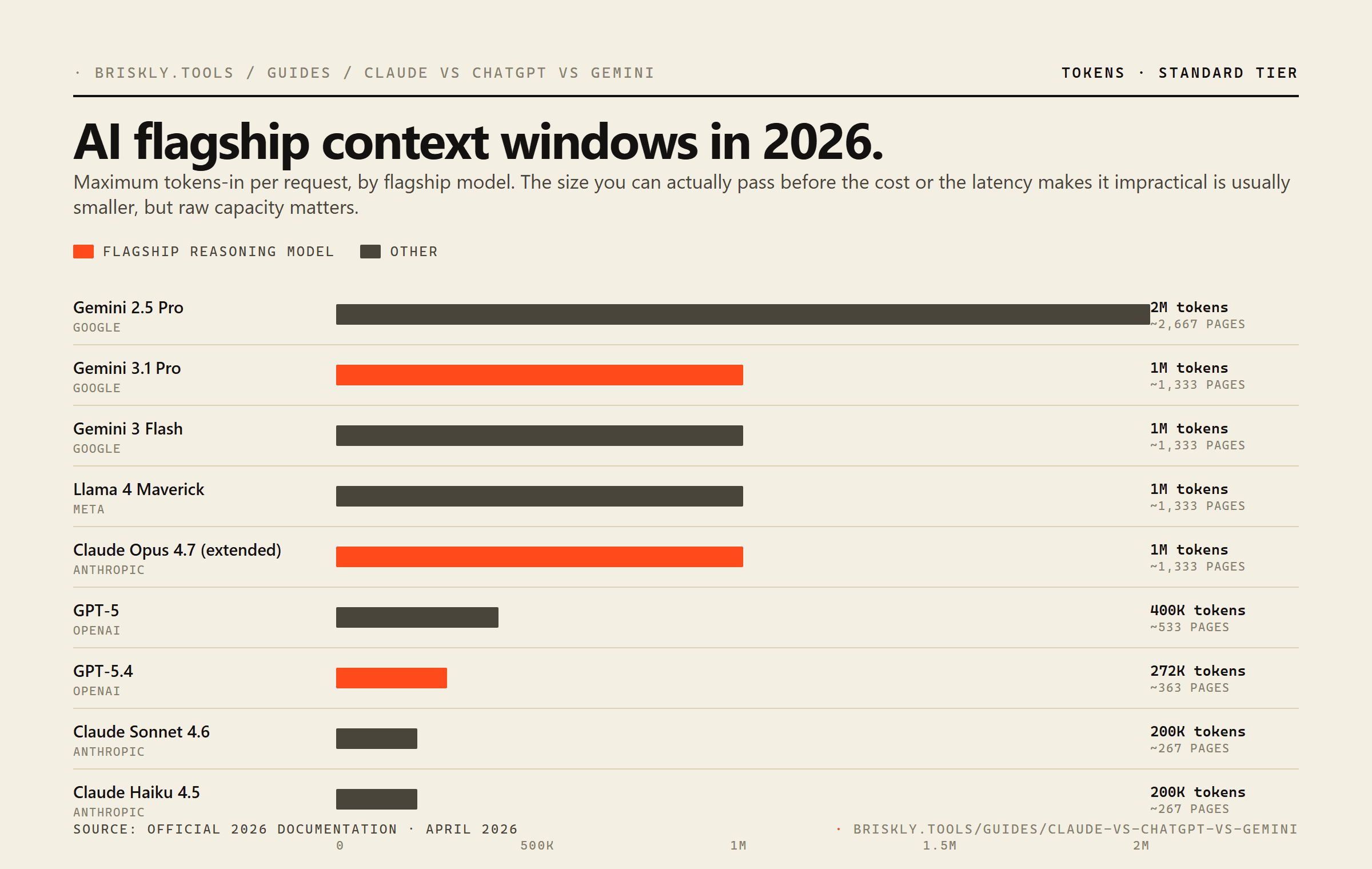
What Claude Agent SDK does well: reliable tool-use (fewer malformed tool calls than any other vendor in my experience), very long context (200K on paid plans, 1M on Opus 4.7), prompt caching that cuts repeat-context cost by ~90%, and subagents that can be spawned with their own isolated context so the main conversation doesn't fill up with intermediate work.
What it's weaker at: image generation and voice require going outside the SDK. No built-in persistence layer (you bring your own database for state). TypeScript support is good; Python support is complete but slightly newer.
OpenAI Agents SDK
OpenAI's first-party agents framework, built on top of the Responses API and replacing the earlier Assistants API over time. Works with GPT-5.4, GPT-5, o4-mini, and other OpenAI models. Key distinctive features: built-in handoffs between agents, structured outputs baked in, and native Image Generation and Code Interpreter tools.
What OpenAI Agents does well: tight integration with the rest of the OpenAI stack (DALL-E, voice, code interpreter all in one agent), structured outputs that are genuinely reliable, and a handoff model that simplifies certain multi-agent patterns.
What it's weaker at: shorter context than Claude for most tiers, prompt caching is less configurable, and tool-use reliability runs slightly behind Claude in my testing on complex multi-tool flows.
LangGraph (LangChain)
A stateful graph framework for building agents where the flow is defined as a directed graph of nodes and edges rather than letting the model decide every step. Works with any LLM provider through LangChain's model adapters. Built-in persistence, resumability, and human-in-the-loop checkpoints.
What LangGraph does well: explicit control over agent flow, provider-agnostic (swap Claude for GPT-5 by changing one import), production features like checkpointing and time-travel debugging, strong multi-agent support via graph nodes.
What it's weaker at: more boilerplate than vendor SDKs, steeper learning curve (you have to think in graphs), and the abstractions occasionally leak (you still end up reading LangChain source to debug edge cases).
CrewAI
A Python-first framework for role-based multi-agent systems. The mental model is "a crew of specialists who each own part of the work." You define agents with personas, goals, and tools; then define tasks; then kick off the crew. CrewAI handles the orchestration.
What CrewAI does well: cleanest abstraction when the work genuinely decomposes into roles (research plus analysis plus writing plus review is a classic fit), fast time-to-prototype for multi-agent demos, good defaults for common patterns.
What it's weaker at: single-agent workflows (overkill), flows that need tight control (you're trusting the framework's orchestration), and performance at high agent counts (the abstractions add overhead).
n8n
A low-code workflow automation platform that added AI agent nodes in 2024 and expanded them significantly since. Self-hostable (free) or cloud-hosted. The agent nodes sit inside a larger workflow graph, so an n8n "agent" is usually a workflow with some LLM-reasoning steps rather than a fully autonomous agent.
What n8n does well: non-developers can build and maintain workflows, fast time-to-ship for integration- heavy tasks, hundreds of pre-built nodes for common services (Slack, Gmail, Notion, Stripe), and a visual debugging experience that's nicer than reading code logs.
What it's weaker at: complex reasoning flows that don't fit a flowchart, version control (you can export JSON but merging is painful), and scaling past a certain complexity threshold where code-based solutions become more maintainable.
Microsoft AutoGen
Microsoft's multi-agent conversation framework. Agents talk to each other in defined groups, coordinated by a designated speaker selector. Closest in spirit to CrewAI but with deeper integration into the Microsoft ecosystem and a stronger emphasis on conversational orchestration.
What AutoGen does well: enterprise integration (Azure, .NET, Copilot), conversation-driven multi-agent patterns, and a strong research-paper backing if you're trying to reproduce specific multi-agent techniques from literature.
What it's weaker at: smaller community than CrewAI or LangGraph, fewer tutorials and StackOverflow answers, and the conversation abstraction can feel forced when your agents don't naturally talk to each other.
How to pick: a practical framework
Four questions answer the pick for most teams.
· The four-question filter
- Does the agent's logic fit on a flowchart?If yes and your team includes non-developers, use n8n. If yes and your team is developers-only, use LangGraph. If no, keep going.
- Does the work decompose into distinct roles?If yes (researcher, writer, critic style), use CrewAI or AutoGen.
- Do you need provider portability?If yes, LangGraph.
- Otherwise?Claude Agent SDK for reasoning-heavy work, OpenAI Agents SDK for image or voice workloads.
Cost in practice
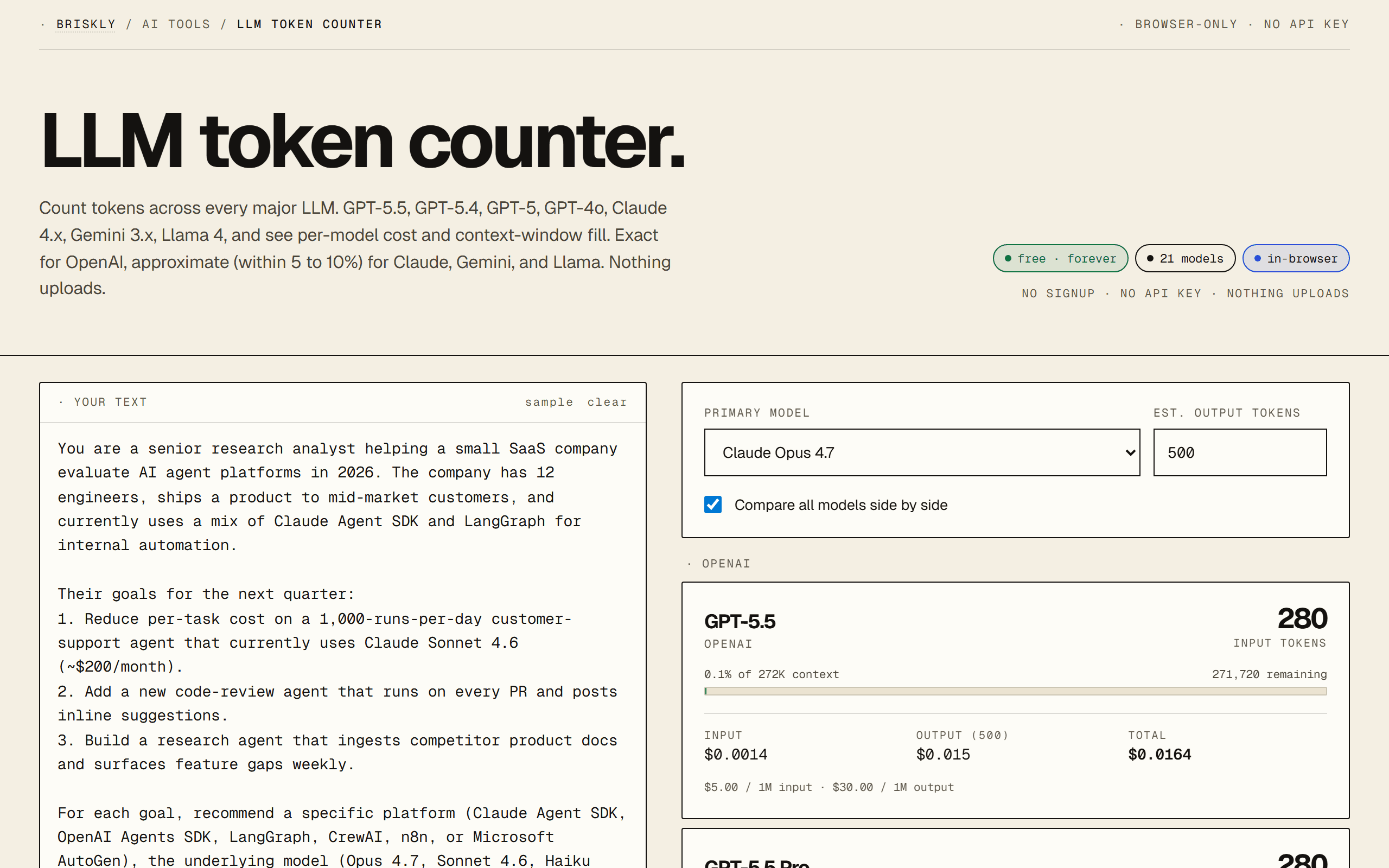
The platforms themselves are free (or have free tiers); the cost is in the LLM API calls underneath. Rough math for a simple agent that runs 1,000 times per day, each run using 4,000 input tokens and 500 output tokens:
Prompt caching on Claude cuts repeat-context cost by ~90%, which often turns a $200/month agent into a $30/month agent if the same context is reused across calls. See our prompt caching guide for the actual math with a live calculator.
FAQ
What counts as an AI agent platform in 2026?
A platform that lets you build an LLM-backed system that can plan, call tools, remember state across turns, and execute multi-step tasks without a human in every loop. That distinguishes it from a chat API (one turn in, one turn out) and from a no-code automation tool like Zapier (rigid triggers, no autonomous reasoning). The overlap is getting fuzzier: n8n has agent nodes, Zapier has AI actions, and Claude's Agent SDK blurs the line between SDK and framework. But the useful working definition is: tool calling plus planning plus memory plus orchestration, in one package.
Claude Agent SDK vs. OpenAI Agents: which should I pick?
Claude Agent SDK if you need the most reliable tool-use and longest context window (200K to 1M tokens depending on tier). OpenAI Agents SDK (built on the Responses API) if you need tight integration with the rest of the OpenAI stack or specifically want image generation in the same agent. Both produce production-grade output. In practice, most teams shipping agents in 2026 run Claude for the reasoning-heavy agents and OpenAI for the ones that need DALL-E or voice. The SDKs are easy to swap between because both now follow a similar tool-calling convention.
Why use LangGraph instead of a vendor SDK?
Three reasons: (1) you want to swap providers mid-agent without rewriting, (2) you want explicit state-graph control over the agent's flow rather than letting the model decide every step, (3) you're building something stateful with human-in-the-loop checkpoints. LangGraph gives you a proper state machine you can inspect and resume. The cost is more boilerplate; a Claude or OpenAI SDK agent is a few dozen lines, a LangGraph equivalent is a few hundred. Pick LangGraph when the control is worth the overhead, which is usually once you've hit a bug in a vendor-SDK agent that you couldn't reproduce.
When does CrewAI beat LangGraph?
When your mental model for the problem is 'I have three people who each handle a different piece.' CrewAI was built for role-based multi-agent orchestration: a 'researcher' agent, a 'writer' agent, a 'critic' agent, each with its own persona and tool set. LangGraph can do this but the graph gets dense. CrewAI's abstractions read more naturally when the work actually decomposes into roles. The catch: if you try to use CrewAI for single-agent workflows, it's overkill. Use the right abstraction for your actual problem shape.
Is n8n an agent platform?
Sort of. n8n is a low-code workflow automation platform that added AI agent nodes in 2024 and has expanded them significantly since. If your agent is really a workflow with some LLM-powered steps, n8n is faster to build and easier to maintain than code. If your agent is genuinely reasoning-driven (deciding which tools to call dynamically, recovering from failures, handling open-ended input), the code SDKs are better. A useful test: can you draw your agent's logic on a whiteboard as a flowchart? If yes, n8n. If no, use Claude Agent SDK or LangGraph.
What about Microsoft AutoGen and Semantic Kernel?
AutoGen is Microsoft's multi-agent framework, closest in spirit to CrewAI. Semantic Kernel is the broader orchestration layer for LLM apps in .NET and Python. Both are production-used at enterprise scale. If you're in the Microsoft ecosystem (Azure, .NET, Copilot), these are the obvious choice because integration with the rest of your stack is free. Outside of that, the adoption curve is steeper than Claude SDK or LangGraph, and community examples are fewer.
Should I use a platform or just build from scratch with raw API calls?
If your agent is a single-turn tool-calling loop (prompt, tool result, final answer), raw API calls are fine and arguably cleaner than an SDK's abstractions. As soon as you add multi-step reasoning, error recovery, or memory, the SDK's scaffolding starts paying for itself. The inflection is usually around the point where your agent's main loop is more than 100 lines of branching code. Before that, raw. After that, SDK or framework.
What's the cheapest agent platform to start with?
All the open-source frameworks (LangGraph, CrewAI, AutoGen) are free; you only pay for LLM API tokens underneath. n8n has a self-hosted free tier and a paid cloud. Claude Agent SDK and OpenAI Agents SDK are free to use but the underlying model calls are where the cost lives. For experimenting: start with Claude Haiku 4.5 ($1 input / $5 output per 1M tokens) or GPT-5.4 mini, which will cost a few dollars to build a working agent end-to-end. Scale to bigger models once the architecture holds.
Can I switch platforms later if I pick wrong?
Agent code is reasonably portable if you design it portable: tool definitions as plain JSON-compatible objects, prompt strings as constants, state as a typed object. The main lock-in is specific features like Claude's prompt caching (which matters a lot for cost), OpenAI's Assistants persistence, or LangGraph's checkpointing. Plan for a rewrite when you switch, but it's usually a 1 to 2 day rewrite for a well-structured agent, not a project-from-scratch.
What about MCP (Model Context Protocol) servers in this picture?
MCP is a protocol, not a platform. It standardizes how agents talk to external tools and data sources. Claude Agent SDK, OpenAI Agents SDK, and many third-party platforms now speak MCP. The practical effect: if you publish an MCP server, every major agent platform can use it without per-platform adapters. This is why the Briskly MCP server (briskly-mcp-llm-token-counter) works in Claude Desktop, Cursor, and any other MCP-compatible client without code changes. Worth learning MCP even if you're building on a single platform today.
Related
- · LLM token counter, for estimating agent cost before you build.
- · Claude vs ChatGPT vs Gemini, for picking the underlying model first.
- · Claude pricing in 2026, compared, for the cost math beneath any agent platform.
- · MCP server primer, for building tools that work across every agent platform.
- · Prompt caching explained, for keeping agent costs down once you ship.
- · Briskly AI hub, every AI resource in one place.