· on this page
The honest version: AI is great at the drafting, the reading, and the negotiating of a freelance contract. It is not great at the enforcingof one. The difference matters. Drafting a clause is a language task, and language models are very good at language. Knowing whether that clause holds up in Ontario vs. California vs. New South Wales is a jurisdiction task that depends on current case law a model may not have seen.
Three real workflows below, each for a different stage of getting a signed contract. The short version: if the engagement is under about $10K and fits a standard pattern (services, hourly or fixed, one jurisdiction), our free contract generator plus an AI read-through is enough. Above that threshold, layer in an attorney review.
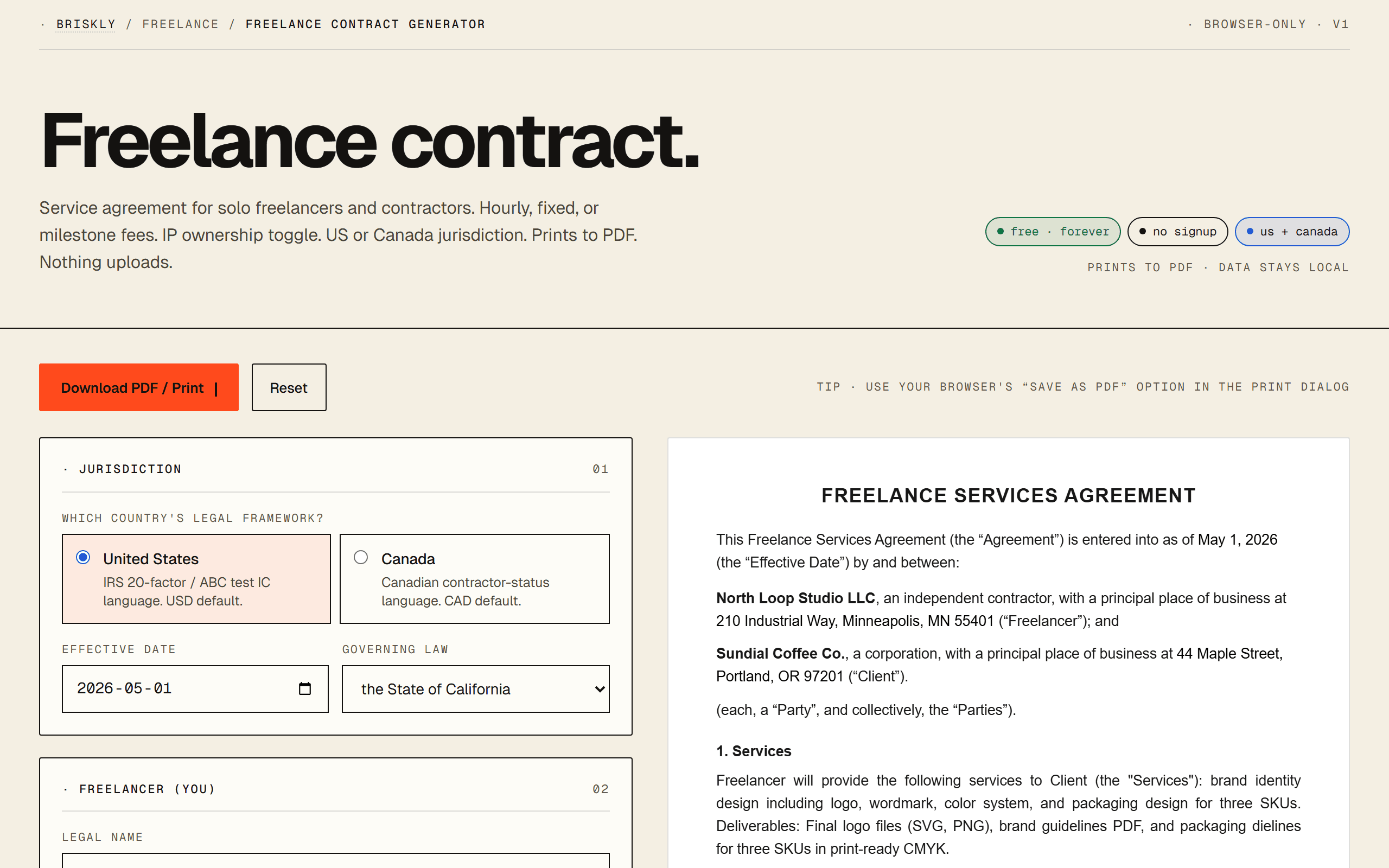
Workflow 1: Claude for the first draft
Starting from a blank page with AI produces a contract that reads fine but often misses clauses you did not think to ask for. Starting from a template and asking AI to customize it is much stronger. The failure mode of “Claude, write me a freelance contract” is a plausible-looking document missing a termination clause or a limitation of liability.
- Generate the base contract with the freelance contract generator. Select US or Canada jurisdiction, fee structure, IP model. Save the PDF.
- Paste the contract text into Claude along with a brief description of the engagement: what you are building, who the client is, anything non-standard (prepaid milestones, exclusivity, non-compete consideration).
- Ask Claude four questions: (1) does this cover the engagement I described, (2) what clauses are missing for my specific situation, (3) which clauses skew too far in favor of one party, (4) is there any language the client is likely to push back on.
- Apply the suggested edits to the generator before finalizing, or paste the AI-suggested clause rewrites directly into a copy of the PDF for the redline round.
Workflow 2: ChatGPT Canvas for redline negotiation
The part of freelance contracting most people hate: the client sends back redlines and you have to decide which to accept, which to push back on, and which to counter-propose. Canvas makes this manageable because you can paste both versions and iterate out loud.
- Paste your original contract and the client's redlined version side by side (or in two code blocks) into ChatGPT.
- Ask: “Summarize the substantive changes vs. cosmetic changes. For each substantive change, explain who benefits and by how much.” This surfaces the two or three redlines that actually matter.
- For each material change, ask: “If I push back on this, what is a reasonable counter that gets me most of what I want without killing the deal?” Canvas produces three variants (soft / neutral / firm).
- Draft the response email in Canvas, iterating until tone matches your voice and the prior emails in the thread. “Match the register of my last three emails” is a useful prompt when you have pasted the thread in.
Workflow 3: Gemini for jurisdiction and compliance checks
If you or your client are in a jurisdiction you do not work in often, or if the engagement touches regulated data (health, finance, children, EU personal data), ask an AI specifically to flag clauses that may not hold or that may need additional language.
A workflow that works: paste the finalized contract into Gemini with “I am a US freelancer. The client is in [jurisdiction]. The work involves [type of data or industry]. Which clauses in this contract may need jurisdiction-specific adjustments, and what might be missing?” Gemini often catches things like California non-compete restrictions, GDPR data processor language, or Quebec French-language consumer-protection quirks. Not guaranteed to catch everything; guaranteed to catch some of what you would otherwise miss.
The prompt template that works
Paste this into Claude, ChatGPT, or Gemini. The structure forces you to declare the facts a model needs to produce useful output, and prevents the “generic contract boilerplate” failure mode.
I am reviewing / drafting a freelance services contract.
Help me work through it.

ENGAGEMENT TYPE:
- Work: [e.g., front-end development, brand identity design]
- Duration: [fixed-term / open-ended / retainer]
- Fee structure: [hourly / fixed / milestone]
- Approximate total: $[X]
- Deliverables: [1-2 sentences]

PARTIES:
- Freelancer: [me, based in <country/state/province>]
- Client: [industry, size, based in <jurisdiction>]

JURISDICTION:
- Governing law: [state / province / country]
- Cross-border: [yes/no; if yes, both sides listed]

NON-STANDARD TERMS (if any):
- IP ownership: [work-for-hire / license-back / retain]
- Exclusivity: [none / industry / time-bound]
- Regulated data: [health / financial / EU personal / none]

CURRENT CONTRACT:
[paste the contract text]

ASK:
1. What clauses are missing for this specific engagement?
2. Which clauses skew unusually in favor of one party?
3. Which clauses are likely to trigger client pushback?
4. Are there jurisdiction-specific issues I should flag?
5. If the client sends back redlines, which changes should I
   accept, push back on, or counter?
Iterate with follow-ups: “Draft the response email to the client accepting redlines 1 and 2 and pushing back on redline 3.” “What is the simplest version of clause 5 that still protects me?”
Where AI genuinely beats a template
- Explaining contract language in plain English. A client sends you a 20-page services agreement. Paste it into Claude, ask for a plain-English summary section by section. You will understand it in 5 minutes instead of 45.
- Responding to redlines. AI catches the difference between a cosmetic and a substantive change faster than most humans, and drafts the response in three tones.
- Negotiating specific clauses. “Draft three versions of this termination clause with progressively shorter notice periods” gives you a ladder of positions to negotiate from.
- Translating between English and legalese. Useful both ways: plain English to clause language when drafting, clause language to plain English when reviewing.
- Flagging missing clauses. Starting from a template and asking “what is missing for this engagement” catches the 1-2 clauses you did not know you needed.
Where a template (and a lawyer) beats AI
- Structural completeness. A good template includes every clause that experienced contract drafters consider standard. AI from scratch sometimes omits limitation of liability or survival clauses because you did not ask.
- Jurisdiction-specific enforceability. AI sometimes hallucinates state or provincial law. A template with jurisdiction toggles gets the IC status clause right for IRS/ABC vs. CRA automatically.
- Current regulatory compliance. Training cutoffs miss recent statute changes. For regulated work (HIPAA, GDPR, FINRA), do not trust a general-purpose model.
- High-stakes engagements. Equity compensation, cross-border deals, regulated industries, anything with material downside. A licensed attorney in your jurisdiction is non-negotiable. AI is not a substitute for a 30-minute attorney consult.
- Signing workflow. AI drafts the language. Getting the contract signed (e-signature with audit trail, storing executed versions) is what a tool like Dropbox Sign or DocuSign handles. Do not email a PDF and call it done.
Our pragmatic recommendation
For most freelancers: start with a template-generated contract for the structural completeness. Paste it into Claude or ChatGPT to customize for your specific engagement and catch missing clauses. Use AI to handle client redlines. For anything material, have a licensed attorney in your jurisdiction review before signing.
We built a free freelance contract generator to be the structural base layer AI works on top of. It handles the parts AI hallucinates (jurisdiction-specific IC language, standard clause inclusion) so AI can do the parts it does better (customization, redlining, negotiation language).
FAQ
Can I actually use AI to draft a freelance contract?
Yes, with an important guardrail. AI is good at generating clause language, explaining the reasoning behind clauses, redlining client redlines, and handling negotiation emails around contract terms. AI is bad at the one thing that matters most in a contract: knowing whether the specific language is enforceable in your specific jurisdiction for your specific facts. The workflows that work pair AI (for the drafting and the communication) with a jurisdiction-aware template (for the actual legal structure) and, for anything material, a licensed attorney review.
Which AI is best for contract drafting?
Claude 4.7 is the strongest at legal-adjacent drafting because it produces more structurally consistent output, respects constraints reliably, and flags its own uncertainty more honestly. ChatGPT-5.4 is nearly equivalent for drafting and has Canvas for iterative redlining. Gemini 3.1 Pro is better than both at cross-checking clauses against specific statutes when you give it the statute text. For most freelancers: Claude for the first draft, ChatGPT for negotiation emails, Gemini or Claude for jurisdiction-specific checks.
What prompt should I use to draft a contract with AI?
Structure beats length. The pattern that works: (1) state what kind of engagement it is, (2) state both parties in one sentence each, (3) describe the scope and deliverables, (4) state the fee structure and timeline, (5) state the jurisdiction, (6) ask for specific clauses you want included. Never ask for a generic contract; always anchor it to your actual situation. A copy-paste template is below.
Should I ask AI to draft the whole contract from scratch, or use a template?
Use a template. Here is why: a generator like ours produces structurally consistent contract prose with jurisdiction toggles, IC status language, and IP clauses that are battle-tested. AI-drafted contracts from scratch sometimes miss clauses that matter (limitation of liability, survival clauses, governing law) because the model prioritizes the sections you asked about. The fastest workflow is: generate the base contract with a template, then paste it into AI and ask the model to flag anything missing or suggest tweaks for your specific scope.
Can AI help me respond to a client's contract redlines?
Yes, and this is arguably AI's most valuable use case in freelance contracting. When a client sends back redlines, paste both versions (your draft + their redlines) into Claude or ChatGPT and ask: (1) which changes are cosmetic vs. substantive, (2) which substantive changes shift meaningful risk to you, (3) how to respond to each. This is hard to do cold because it requires holding two documents in mind while maintaining business context. AI does it in one pass and flags the clauses you would have accepted without reading carefully.
Is it safe to put client details into an AI chat?
Depends on the provider and plan. Claude (Anthropic) does not train on paid API or Team/Enterprise conversations by default. ChatGPT (OpenAI) same for paid API and Enterprise; the free ChatGPT and default Plus settings may train on your data unless you have opted out. Gemini inside paid Google Workspace is scoped to your Workspace. For contract work: use the paid plans, redact the client name if the deal is sensitive (call them Client A), and never paste anything under a pre-signed NDA into a consumer-tier chat.
What clauses should I absolutely include in a freelance contract?
Eight clauses cover 95% of what you need: (1) scope of services, (2) term, (3) compensation and payment terms, (4) intellectual property ownership, (5) independent contractor status, (6) confidentiality, (7) termination and kill fee, (8) governing law. A template bakes these in; AI on its own sometimes skips termination or IP if you do not explicitly ask. Our generator includes all eight by default.
Will an AI-drafted contract hold up in court?
The source of the prose does not determine enforceability; the clauses and the jurisdiction do. A contract drafted word-for-word by Claude can be just as enforceable as one drafted by an attorney if the clauses are legally sound and both parties sign. What courts care about: was there offer, acceptance, consideration; was the language clear; was the signing valid; were the clauses legal under applicable law. For most freelance engagements, a template-generated contract plus AI-assisted customization is fine. For material engagements (large fees, equity, regulated industries, cross-border), have a licensed attorney in your jurisdiction review before signing.
Can AI help me negotiate better contract terms?
Yes, in three specific ways. First, it can generate a range of alternative phrasings for a clause you do not like (soft / neutral / firm) so you can hear what each sounds like before you send. Second, it can predict likely client objections to your preferred terms and draft pre-emptive responses. Third, it can translate legalese from a client's contract into plain English so you actually understand what you are agreeing to. The third is the underrated use case: reading a contract with AI as a translator is 10x faster than reading it alone.
What can AI NOT do when it comes to contracts?
Four things worth knowing. (1) Jurisdiction-specific enforceability nuance: AI hallucinates state or provincial law occasionally, especially for less-common jurisdictions. (2) Current regulatory changes: training cutoffs miss the last 6-12 months of case law and statute updates. (3) Industry-specific compliance (healthcare HIPAA, financial FINRA, EU GDPR addenda): general-purpose models are not reliably current on regulated contract requirements. (4) Actual legal advice tied to your specific facts: that is what licensed attorneys are for, and AI is explicitly not a substitute.
Related
- · Free freelance contract generator, the template layer this workflow sits on top of.
- · Free consulting contract generator, the advisory-focused variant.
- · Free NDA generator, for sensitive pre-engagement conversations.
- · How to make an invoice with AI, the sister guide for the invoicing side.
- · How to set your freelance rate with AI, for the pricing side.
- · Briskly freelance hub, every freelance resource in one place.
- · Briskly AI hub, every AI resource in one place.