· on this page
The honest version of this story: AI is great at the reasoning around your rate and bad at the arithmetic of your rate. It will give you a sharp take on what senior React freelancers charge in Toronto in 2026. It will draft a tonally perfect email raising your rate from $125 to $150. It will also sometimes hallucinate a federal tax bracket by two points, or forget that self-employment tax compounds on top of income tax. The workflows that actually work in 2026 pair AI (for the reasoning and the writing) with a deterministic calculator (for the numbers that need to be right).
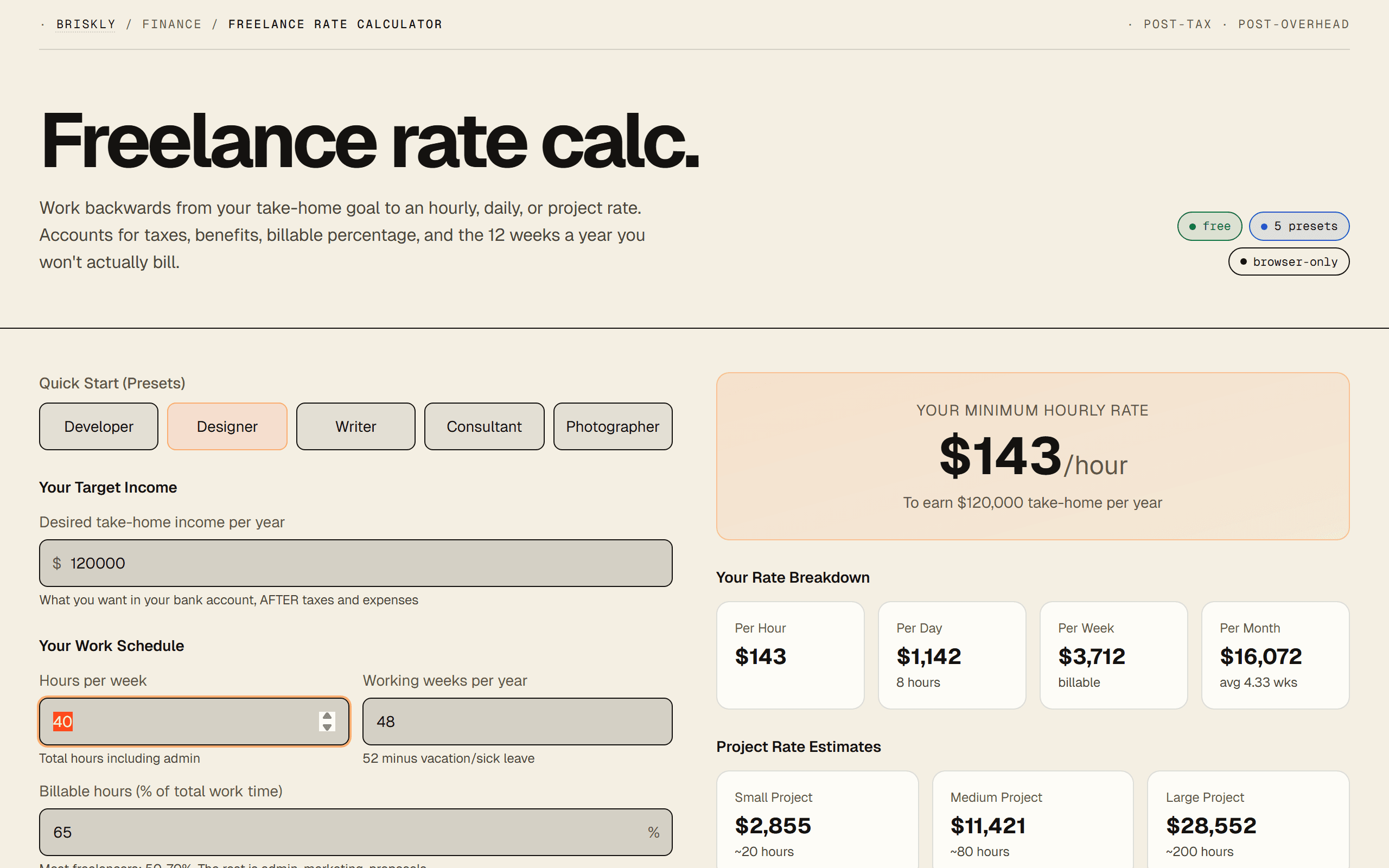
Three real workflows below, each for a different step of setting your rate. The short version of all of them: for the actual math, use our free freelance rate calculator. For the research, positioning, and negotiation, which is where most freelancers leave money on the table. AI is genuinely useful.
Workflow 1: Claude for market research
The hardest part of setting a rate is not the math, it's knowing what the market is actually paying for your specific niche. Static calculators don't have that data. BLS data is two years out of date. Glassdoor skews toward employees. Claude (on paid plans with web access) can synthesize from public sources faster than you can.
- Define your niche specifically. "Senior backend engineer" is too broad. "Senior Node.js developer with Postgres and AWS specialization, 8 years experience, based in Toronto" gets useful answers.
- Ask Claude for a rate range with low/mid/high market positioning. Not "what should I charge" but "what is the 25th, 50th, 75th percentile hourly rate for this profile in 2026, with sources."
- Cross-check against three things Claude can't directly fetch: a recent job posting in your niche on LinkedIn or Upwork, a peer's rate if you can ask one, and your own prior-client rate history. AI research plus three real data points is usually close.
- Use the calculator to back out what that hourly rate means for your actual take-home after tax, benefits, and unbilled time. The calculator handles the part AI hallucinates.
Workflow 2: ChatGPT Canvas for negotiation
This is the single most underrated use case for AI in freelance work, and almost nobody talks about it. Raising your rate with an existing client is stressful; drafting the email is where most freelancers either delay the conversation for months or undersell themselves. ChatGPT Canvas opens a document you can iterate on with natural-language feedback, and it's excellent at tone calibration.
- Paste the context: current rate, proposed new rate, length of engagement, client size, any recent shifts (scope, responsibility, market).
- Ask Canvas for three versions: softer, neutral, firmer. Good phrase: "draft three versions of an email raising my rate from $X to $Y, one apologetic, one matter-of-fact, one confident." You'll see what your actual voice sounds like in each register.
- Pick the register that matches the relationship, then iterate. "Shorten the second paragraph." "Remove the part about market rates, it sounds defensive." "Add a specific example of the scope expansion." Canvas rewrites in place.
- Ask for anticipated objections: "What are the top three ways this client might push back, and how should I respond to each?" This is the prep that makes the live conversation go well.
Workflow 3: Gemini for cost-of-business reverse engineering
The other place freelancers underprice is forgetting what an hourly rate actually costs them to deliver. A $125/hr rate feels like $125. After tax, self-employment tax, benefits, unbilled hours, vacation, sick days, and the business expenses you don't bill back, the take-home is closer to $50. Gemini inside Google Workspace is good for this because you can work the math alongside a spreadsheet of your actual expenses.
Better workflow for this than the AI alone: use the calculator to get the take-home number, then ask Gemini to explain what's absorbing the difference. Questions like "I'm charging $125/hr and my take-home is $55/hr, where is the other $70 going, and is that normal for a solo consultant in my bracket?" produce a useful breakdown. For the actual number, trust the calculator; for the understanding of where it went, AI is faster than piecing it together from tax forms.
The prompt template that works
Paste this into Claude, ChatGPT, or Gemini. Fill in the bracketed sections. The structure matters, starting with your work, then your situation, then asking for the range with reasoning, avoids the single-number answer that isn't useful.
I need to set my freelance rate. Help me work it out.

WORK:
- Role: [e.g., senior React developer, editorial illustrator, brand strategist]
- Specialization: [specific stack, style, or industry]
- Years of experience: [X years]
- Deliverable type: [hourly retainers / project-based / mixed]

LOCATION & STATUS:
- Country / region: [Canada / US-CA / UK-London / etc.]
- Work arrangement: [sole proprietor / incorporated / LLC]
- Other income: [none / W-2 day job / multiple clients]

TARGET:
- Take-home goal (after all tax and overhead): $[X]/year
- Desired billable hours per week: [e.g., 25]
- Desired weeks worked per year: [e.g., 46]

ASK:
1. What is the 25th, 50th, 75th percentile hourly rate for this
   profile in 2026, based on public data you have access to?
2. What fully-loaded rate would I need to charge to actually net
   my take-home goal, given typical tax and overhead for my
   location and structure? (Back of envelope is fine.)
3. Where in that range should I position myself given the
   specifics above, and what's the reasoning?
4. What changes if I raise my billable percentage from [current]
   to [higher]?
Iterate from there: "What if I focus on fewer, larger clients instead of hourly retainers?" "What's a reasonable rate jump if my portfolio now includes a Fortune 500 case study?" "How does that number change if I relocate to a lower-tax jurisdiction?"
Where AI genuinely beats a calculator
- Niche market research. Static calculators don't know what senior Rust developers in Berlin charge in 2026. AI synthesizes from public data faster than you can.
- Drafting rate-increase emails. The hardest conversation in freelancing. AI produces tonally calibrated drafts in three registers (soft / neutral / firm) so you can hear what your own voice sounds like in each. Saves 30-60 minutes per conversation and usually lands better than a first-draft email.
- Responding to client pushback. "Client said the new rate is too high. Help me respond without collapsing or getting defensive." AI handles the tone calibration most freelancers struggle with in the moment.
- Justifying premium pricing. "Why should a client pay me $200/hr instead of $125/hr". AI is good at articulating positioning in language that doesn't sound like you're bragging. Translating your value proposition into client-facing language is an underrated skill AI accelerates.
- International rate conversations. "Explain my rate in EUR with a plausible currency buffer". AI handles the translation + buffer reasoning cleanly.
- Modeling scenarios you haven't lived yet. "What does my rate look like if I cut to 3 days/week and raise the hourly rate?". AI walks through the math + the positioning implications in one pass.
Where a calculator beats AI
- Deterministic arithmetic. AI sometimes hallucinates tax brackets. A calculator with curated tax tables does the math the same way every time. For anything you'll put in a contract, use the calculator.
- Interactive "what if" iteration. Changing one slider and seeing the effect ripple through hourly / daily / weekly / project rates in real time is a calculator's natural mode. AI has to redo the math every turn, which is slower and errorprone.
- Saving your inputs. Browser-based calculators persist your numbers locally. AI sessions don't reliably remember unless you use memory features, which are still maturing in 2026.
- Billable-hour defaults grounded in data. A calculator can encode "most solo freelancers bill 60-70% of available hours" as a sensible default. AI will say anything from 50% to 90% depending on how you ask.
- Tax-rate accuracy at scale. For US federal 2026 brackets AI is usually correct. For state, provincial, or international brackets, verify. A calculator with a curated tax table is safer than a model guessing.
Our pragmatic recommendation
For most freelancers: use a calculator for the numbers, use AI for everything around the numbers. The calculator tells you that a $150K take-home goal means charging $165/hr at 28 billable hours/week and 46 weeks/year. AI tells you that $165/hr is the 70th percentile for your niche, drafts the email to your client explaining the jump from $140, and predicts which three concerns they're likely to raise.
We built a free freelance rate calculator specifically to be the deterministic layer you pair with AI-augmented rate research. It does the math (taxes, benefits, billable-hour reality, currency, round-number project rates) so AI can do the parts it does better, positioning, research, writing, tone.
FAQ
Can I actually use AI to set my freelance rate?
Yes, but with a split. AI is great at the qualitative layer, researching what comparable freelancers charge, drafting rate-increase emails, justifying a premium, and explaining complex line items. AI is not great at the quantitative layer, deterministic tax math, current-year bracket accuracy, and iterating on 'what if I charge $125 vs $150.' The workflows that actually work pair AI for the reasoning with a dedicated calculator for the arithmetic.
Which AI is best for freelance rate research?
Claude 4.7 has the most up-to-date training data for 2026 rate benchmarks and the most reliable tool-use for pulling from the web when you give it sources. ChatGPT-5.4 is nearly equivalent and has Canvas, which is useful for iterating on rate-justification documents. Gemini 3.1 Pro is the weakest of the three for this use case, rate research benefits from long-context reasoning, and Claude handles 200K-token context windows more reliably. For most freelancers: Claude for research, ChatGPT for client-facing writing, a dedicated calculator for the numbers.
What prompt should I use to find my freelance rate?
The prompt that works: (1) declare what you do specifically, not generically, 'senior React developer with Next.js + tRPC specialization' beats 'web developer.' (2) State your location and years of experience. (3) State your target take-home, not your target gross, this is the mistake most freelancers make. (4) Ask for a range with low/mid/high market positioning, not a single number. (5) Ask for the reasoning. A full working template is below, ready to paste.
Can Claude read Glassdoor, Levels.fyi, or Upwork data for me?
Partially. Claude with web access (available on paid plans) can read public-facing pages from these sites, but each has different access patterns. Levels.fyi is mostly readable; Glassdoor's detail pages often require login and block scraping; Upwork profile data is visible but rate claims there are self-reported and skew high. The pragmatic move: paste 3-5 comparable profiles or job postings you've manually copied into Claude, and ask it to synthesize. Claude is better at synthesizing known data than at fetching new data on its own.
Is it safe to share my income goals and rate data with AI?
Depends on the provider and plan. Claude (Anthropic) does not train on paid API or Team/Enterprise conversations by default. ChatGPT (OpenAI) same for paid API and Enterprise; the free ChatGPT and default Plus settings may train on your data unless you've opted out in settings. Gemini inside paid Google Workspace is scoped to your Workspace and not used for training. For a one-off rate-planning session: low risk. For repeated use with identifying client names, use API-tier settings or redact client names to 'Client A, Client B.'
What's the fastest way to calculate a freelance rate?
A purpose-built free calculator that accepts your take-home goal and backs out the rate is faster than any AI workflow for the pure math. Our freelance rate calculator does it in under 30 seconds: enter target salary, tax rate, benefits, billable percentage, get hourly/daily/weekly/project rates. AI becomes worth the time for the surrounding work, research, positioning, negotiation emails, not for the calculation itself.
Can AI help me negotiate a higher rate with a current client?
Yes, and this is the single most underrated use case for AI in freelance pricing. Paste the existing engagement terms, your proposed new rate, and the business context. Ask for: (1) the actual email you'd send, (2) two variations, softer and firmer, (3) anticipated client objections and responses to each, (4) a fallback position if they push back. AI handles the tone calibration that most freelancers struggle with, neither apologetic nor aggressive. This saves 30-60 minutes of drafting per rate conversation and usually produces better language than a first-draft email.
Can AI do the tax and overhead math on my rate?
With caveats. AI can set up the structure, here's what goes into a fully-loaded rate, here's how SE tax compounds with income tax, here's why benefits are typically 20-30% of a W-2 equivalent, and it can do the arithmetic if you give it the numbers. It will sometimes hallucinate tax brackets, especially for state-level and international cases. The safer pattern: use AI to explain the framework, then use a calculator with curated tax tables for the actual numbers, then paste the result back into AI for sanity-check and explanation-writing. For US federal 2026 brackets Claude is generally correct; for state, provincial, and international brackets, verify.
What can AI NOT do when it comes to freelance pricing?
Four things worth knowing. (1) Persist your numbers across sessions reliably, unless you're using memory features, you re-explain your situation each time. (2) Do real-time currency conversion, training-cutoff exchange rates are usually close but not exact. (3) Know your specific client's budget. AI can guess, but the only data it has is what you give it. (4) Legally advise on contractor status, tax registration thresholds, or whether you should incorporate. AI can summarize rules but the legal question is on you, not the model.
Will AI eventually replace freelance rate calculators entirely?
Probably not for the same reason AI won't replace calculators generally: deterministic arithmetic is a solved problem that doesn't benefit from language-model reasoning. The future is AI agents that call calculators as tools, you ask Claude 'what should I charge this client' and Claude calls a rate-calculator API with structured inputs, then wraps the output in positioning advice. That's a better product than 'AI does math' or 'calculator is static.' Our calculator is designed to be the deterministic layer AI agents call into.
Related
- · Free freelance rate calculator, the deterministic tool this workflow points back to.
- · How to invoice as a freelancer, the other half of freelance money math.
- · How to make an invoice with AI, the sister guide for the invoicing side.
- · System prompts, explained, how to write better prompts for things like this.
- · Claude vs ChatGPT vs Gemini, which AI is actually better at what.
- · Briskly freelance hub, every freelance resource we publish in one place.
- · Briskly AI hub, every AI resource we publish in one place.